

Every feature of The Little Worker, on every screen you use.
Write a to-do and give it to a worker. It does the work and brings it back to Today, done, with every step there to check. Pick the web, the Mac or the iPhone to see each feature where you use it.
Free with your own AI key. No card.
Your whole day on one page.
Today holds your to-dos and your team. You see who is busy, what needs you, and what came back done.


Write it the way you think.
Type a to-do in one line and press Return. It lands in Yours, ready to do or to give.
Done comes back to Today.
When a worker finishes, the to-do moves to Done with the result under its title. You read it right there.
Your team at a glance.
Each worker's face sits at the top with one word under it: Available, Busy or Needs You.
Hand it off in one move.
Any to-do on your list can go to a worker. You stay on Today while the work gets done.


Drag it to a face.
Drag a to-do onto a worker's face. The face lights up, and the work starts when you let go.
A team with a job each.
Lou leads the team. Add a writer or a researcher, and give each one the work it does best.
Your own to-dos stay yours.
A to-do waits in Yours until you give it. You choose what goes and who takes it.
You choose what it may do.
Money and password steps are always yours. When a worker needs your yes, it asks, and the work waits for your answer.


Allow or Don't Allow.
Each ask says what the step does, in plain words. Open Details to see the exact step before you answer.
Needs You, at the top of Today.
Every ask waits in one place, with its button beside it. Answer one and the work goes on.
Ask First, app by app.
Each app you connect starts on Ask First. You pick Allow, Ask First or Off for each one.
Read every step.
Every task keeps its steps in plain words. You can see what the worker read, opened and did, in order.


Steps, with their times.
Each step says what happened and when: the file it read, the page it opened, the step still going.
Beside the chat.
Open Steps next to the chat and keep talking. The steps add up as the work goes.
Every task, kept.
History lists every task that is over, so you can go back and read what was done.
Not right? Send it back.
If a result is wrong, you send it back with one sentence. The worker tries again.


One sentence is enough.
Say what should change, like “Keep my jokes. Only fix the spelling.” The worker starts a new try.
Right where the work lands.
Send Back sits beside each finished to-do on Today, and in the chat.
Rules you can read.
Each worker has Rules on its page. You can read them and change them when you like.
It works in the apps you use.
Connect Stripe, YouTube, X, GitHub, Sentry, Cloudflare and Google Calendar. A worker reads what it needs and brings back the answer.

Read and Act, set apart.
Read lets a worker look. Act lets it change things. You set each one for each app.
Every action on record.
Recent Actions lists what workers did in the app, and if you allowed it or a rule did.
Your posts wait for you.
Nothing goes out on X until you allow the exact text.
Set it once. It comes back each week.
A routine starts the same to-do on a schedule. Your Monday numbers check can start every Monday at 8.


Your Monday numbers check.
Every Monday at 8, a worker reads last week's payments in Stripe, views in YouTube, and your posts and mentions on X. One short note lands on Today.
Pause it, or start it now.
Pause a routine for a while, or press Start Now to try it today.
Each one under its worker.
Routines lists each worker's routines, when each starts next, and how the newest one went.
A weekly read of three apps fits Small or above.
Name a goal. Lou keeps count.
Tell a worker what you want to reach. Goals shows each one with its ring, its target and where it stands.


Set it in one line.
Type the goal the way you would say it. A worker sets it up and keeps it.
See the pace.
Each goal says On Track or At Risk, with its number over time.
To-dos that move it.
Each goal keeps its own to-dos, so the next step is always there.
Work stops at your limit.
You set a monthly limit. When work reaches it, the work pauses and waits. Nothing is charged on its own.


A limit you choose.
Cost shows the month's limit, what is used and what is left.
A notice at 80 percent.
You hear about it before the stop, with how much is used and when it comes back.
Your own AI, no fee on top.
Add a key from your own AI account. That company bills you for the AI, and Little Worker charges nothing on top.
Made for each place you work.
Your to-dos, workers and chats are the same everywhere you sign in. Each app adds a few things of its own.
Mac
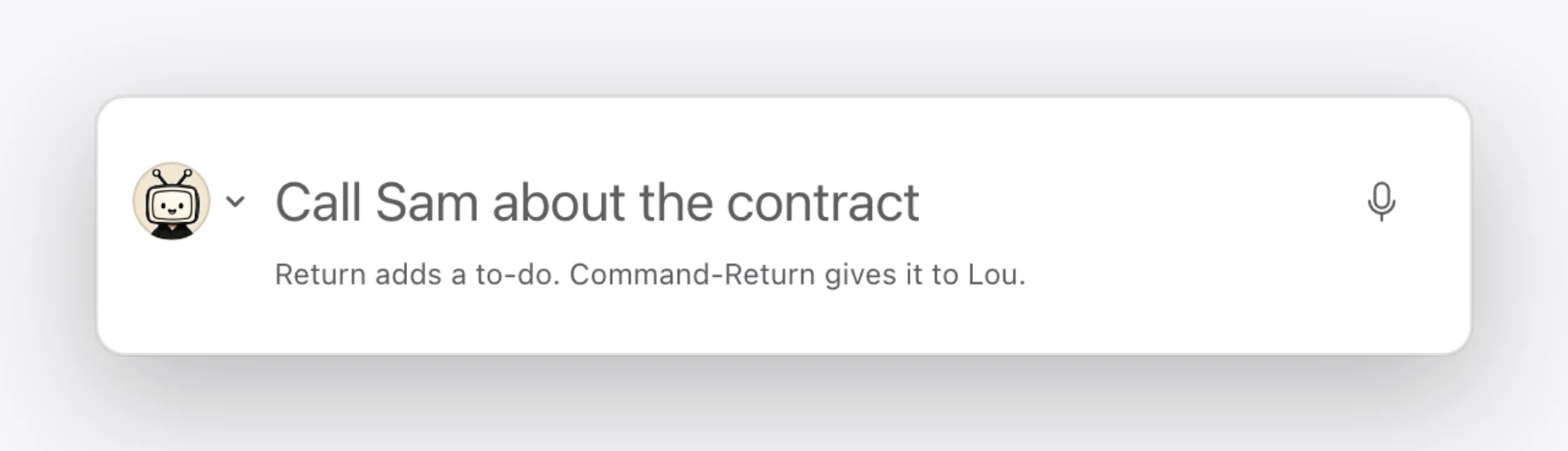
Quick Capture.
Press Control-Space in any app. Type the to-do and press Return to add it, or Command-Return to give it to Lou.
iPhone
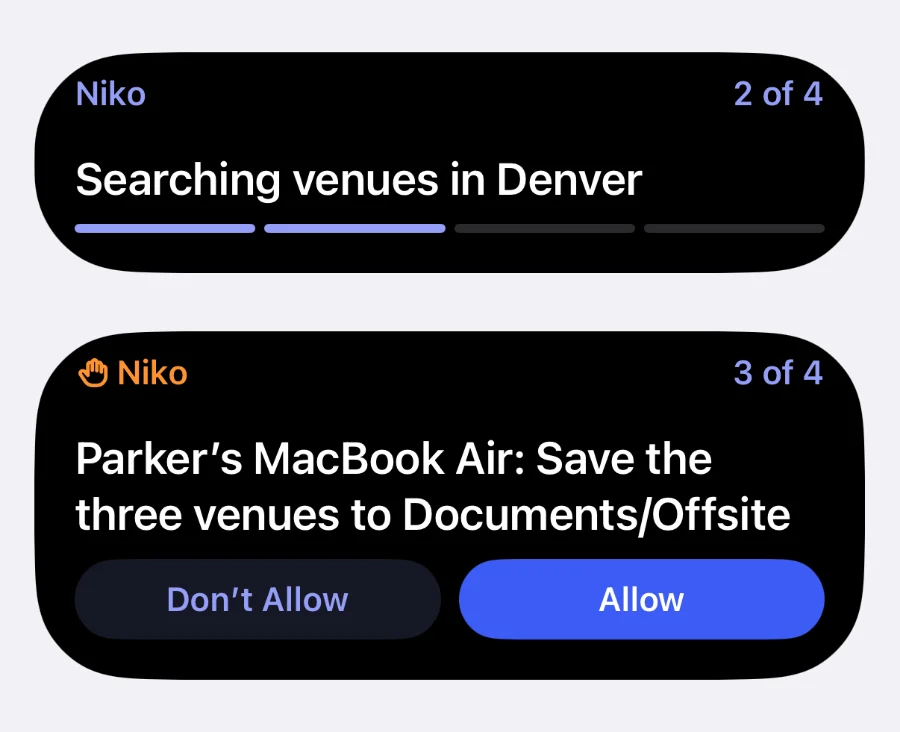
Live Activity.
Follow a worker on your Lock Screen and in the Dynamic Island while it works, and answer when it needs you.
Web
Nothing to install.
Open app.thelittleworker.com in any browser and sign in. Everything is there.


Get it on the web, the Mac and the iPhone.
Web
Any browser
Open in BrowserMac
macOS 13 or later, Apple silicon
Download for MaciPhoneBeta
iOS 26 or later
View in the App Store
Make a list. The worker does it. You see proof.
Free with your own AI key. No card.