
See which AI tool is using your Mac's CPU
Little Mac Stats is a free menu bar CPU monitor. It groups load by app, spots your AI coding tools, and can stop a stuck process after you say yes.
brew install --cask parkerrex/tap/little-mac-statsFree and open source (MIT). Tested on macOS 27 on Apple silicon. Older macOS and Intel Macs are not tested yet.
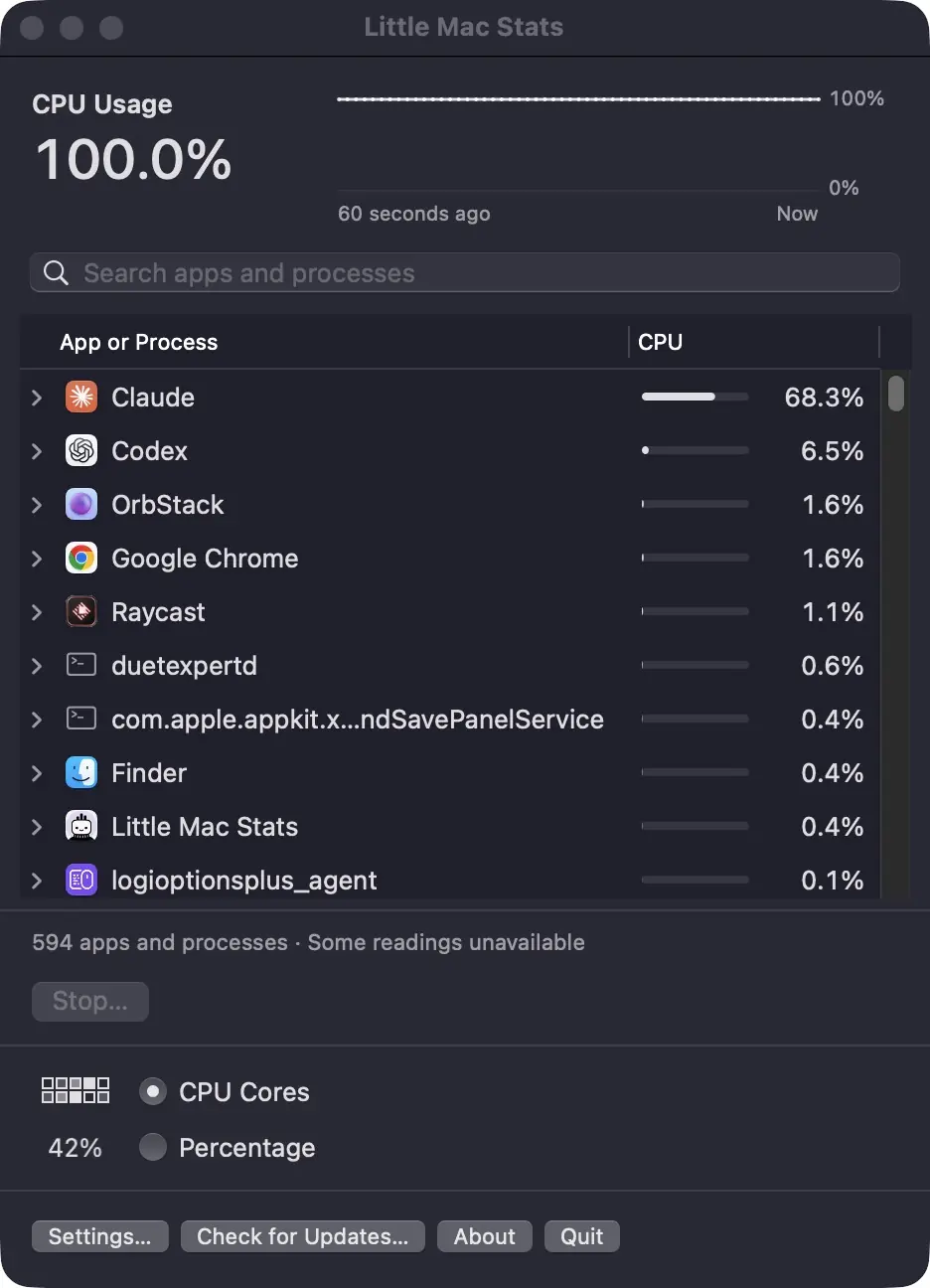
What it does
A small block for each CPU.
In your menu bar, each block fills from empty to solid as that CPU gets busier. Or show one percentage instead.
Load grouped by app.
Total CPU, the last 60 seconds, and which apps are busy right now.
Finds your AI coding tools.
It groups their helpers and the work they start into one total per tool, by the program each process belongs to.
Stops a process safely.
Quit or Force Quit, after you confirm. Right before it acts, it checks the process is still the one you picked. It refuses system processes, other people's processes and itself.
Light on your Mac.
While the menu is closed it checks every two seconds without listing processes, and it pauses while your Mac sleeps.
Install
Install it.
With Homebrew, paste the line above into Terminal. Or download the notarized zip from the latest release, unzip it, and drag Little Mac Stats into Applications.
Open it.
The blocks show up in your menu bar.
Look it up.
Click the blocks and type the name of your coding tool in the search box to see everything it started.
What it reads
- The list of processes on your Mac, and nothing else.
- Process names, paths and CPU readings never leave your Mac, and there is no tracking.
- The only network call is the update check. It's off until you turn it on in Settings or click Check for Updates, and the updates come from GitHub.
Questions
Which app is using my CPU on my Mac?
Activity Monitor lists processes one by one. Little Mac Stats groups them by app, so ten helpers show as one line with one total.
Why does my AI coding tool use so much CPU?
While it works, it starts helpers and tools of its own, and they add up. Little Mac Stats shows the total per tool and lets you stop the stuck part.
Is it a free alternative to the big Mac stats apps?
For CPU only. It doesn't show temperature, fans, memory or network. Bigger stats apps do much more.
Why does one busy process show only about 8%?
Here 100% means every CPU in the Mac is fully busy. On a Mac with 12 CPUs, a process using one whole CPU shows about 8.3%. Activity Monitor shows the same process at about 100%.
Is Force Quit safe?
It asks first, and checks the process again right before acting. It won't touch system processes or another person's processes.
Does it work on Intel Macs or older macOS?
So far I've tested it only on macOS 27 on Apple silicon. Older macOS and Intel Macs are not tested yet. If it doesn't work on yours, tell me in an issue on GitHub.
Is it free?
It's free under the MIT license. No account, and you don't need Little Worker.
Why I made it
I use AI coding tools on my Mac most of the day while I build Little Worker. When one of them pins the CPU, I want to know which one, fast.
Little Worker is what all that work is for: a to-do list with a team of AI workers. Give a to-do to Lou and it comes back done. See Little Worker.
- Also free: Little Limits
- Source on GitHub
- Releases
- Last updated November 2, 2026