BlogBehind the Scenes
How we test the iPhone app: Claude, Codex and a simulator
Work on how the iPhone app looks took 42 percent of our Claude use. We compared four ways to check it on a simulator, and what each one found, missed and cost.
By The Little Worker team6 min read

In one overnight push, the iPhone app changed a lot. The workers got faces, Today got warmer, the chat was rebuilt, and each worker got a page of its own. AI tools wrote most of that code, Claude above all, with a person giving direction and saying yes or no.
Code that compiles is not an app that looks right. Each change has to run on an iPhone simulator (a copy of an iPhone that runs on a Mac), and someone has to look at the screens. Most of the time that someone is Claude, reading pictures of the simulator.
Why the checks got costly
AI tools charge by tokens: small pieces of the text and pictures a model reads and writes. A picture of a phone screen costs many more tokens than a line of code. When we counted our recent Claude sessions, work on what the app looks like used 42 percent of all Claude tokens. Those sessions built the app 366 times, took 932 screenshots and had Claude read 2,191 pictures.
That is a lot of looking. So we asked a plain question: which way of checking the app finds the most real problems for the least cost?
The test
We gave four setups the same job on the same simulator and the same build. Each one looked at four screens, in light and in dark:
- Today with a full list of to-dos
- A chat where Pip is at work
- Pip's worker page
- Today with nothing in it
Each one also did two taps: give the first to-do to Pip, then open Chats.
To know what was really wrong, one more Claude session acted as the judge. It took its own pictures of every screen at 1, 2 and 6 s after the app opened, did both taps, and read the labels that VoiceOver reads. It found four real issues:
| # | Issue | How bad |
|---|---|---|
| 1 | On Today, the first to-do and its Give to Pip button sit under the bars at the bottom of the screen until you scroll. | Minor to medium |
| 2 | When you give a to-do to Pip, it leaves the list and the count drops from 4 to 3, but Pip's face does not change and nothing on screen says Pip got it. | Medium |
| 3 | In a chat, about 2 s after the app opens, Pip's first messages can draw on top of later ones while the screen settles. It happens only some of the time. | Medium, only sometimes |
| 4 | On the worker page, one row has Pip's face and the row under it has no icon, so the text in the two rows does not line up. | Small |
About the second issue: our rule is that a task waiting in line does not make a worker Busy, so Pip's face is right not to say Busy yet. The gap is that nothing on the screen confirms Pip got the task.
The four setups
- Claude alone. Claude takes screenshots with Apple's own command-line tools and reads them. It cannot tap.
- Claude with AXe. AXe is a free command-line tool that taps and types on a simulator and reads the same labels VoiceOver reads. Claude decides what to tap and reads both the pictures and the labels.
- Claude with a Codex judge. Codex is OpenAI's coding agent. Here a fixed script takes the pictures and does the taps, and Codex grades the pictures against a checklist. Claude only starts the script and reads the result.
- Codex with computer use. Codex runs the whole check by itself and works the simulator on its own. Claude only starts it.
Setups 3 and 4 start Codex from the command line, with no person at the keyboard. This is the command, shortened:
codex exec -m gpt-6.1-sol -c model_reasoning_effort=high \
  --cd run-folder -o last_message.txt "$(cat prompt.txt)" < /dev/null
What we found
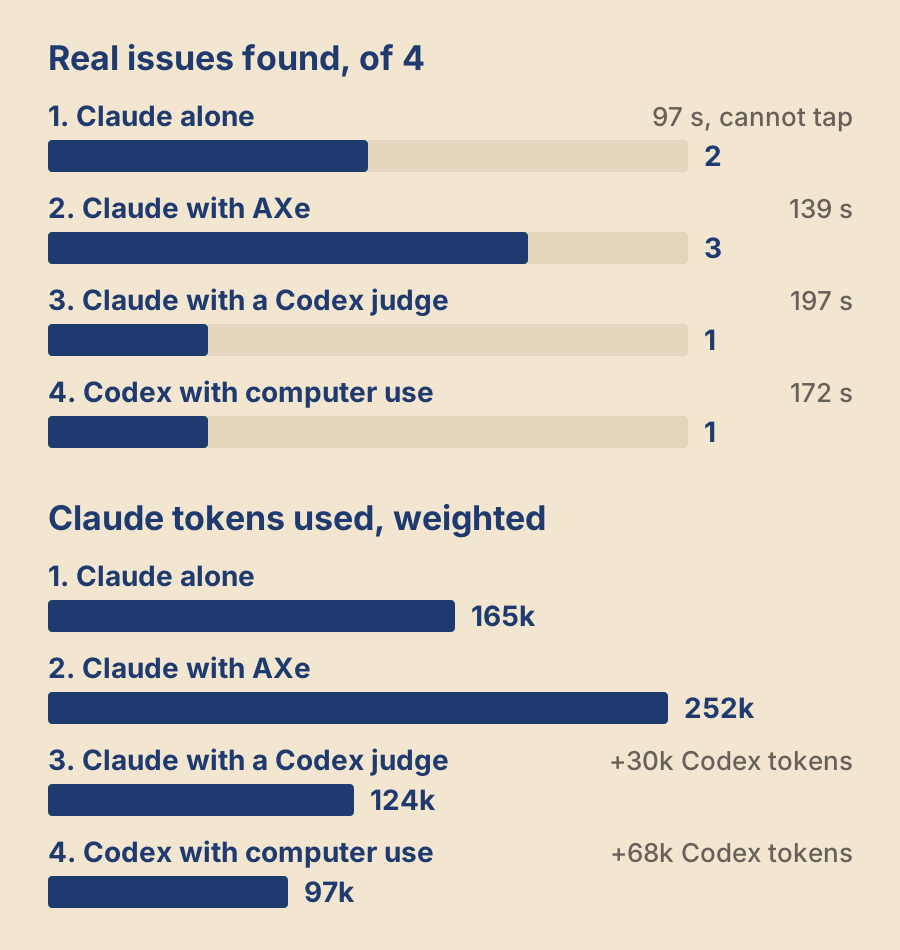
| Setup | Claude tokens | Codex tokens | Issues found | Wrong alarms | Taps right |
|---|---|---|---|---|---|
| 1. Claude alone | 165,224 | 0 | 2 of 4 | 0 | 0 of 2 |
| 2. Claude with AXe | 251,724 | 0 | 3 of 4 | 1 | 2 of 2 |
| 3. Claude with a Codex judge | 124,169 | 30,447 | 1 of 4 | 0 | 2 of 2 |
| 4. Codex with computer use | 97,328 | 67,878 | 1 of 4 | 0 | 2 of 2 |
Each check took from 97 s (Claude alone) to 197 s (the Codex judge). In the first two setups Claude read 16 to 17 pictures; in the Codex setups it read none, because Codex looked at the pictures instead.
The Claude numbers are weighted, so each kind of token counts by what it costs. Text Claude has already seen counts a tenth, and words Claude writes count five times. About 40,000 to 50,000 of each Claude number is the fixed cost of starting a session at all.
Claude alone was the fastest and had the best eye for layout. It was the only one to see that two rows on the worker page do not line up. But it cannot tap, so it could not check either tap.
Claude with AXe found the most. It did both taps, read the exact labels, and it was the only setup that took more than one picture of a screen over time. That is why it was the only one to catch the chat messages drawing on top of each other. It also made one wrong alarm: it called the Chats tab "the wrong tab" under a worker page that was still loading. Worker pages open from Chats, so Chats was right.
Claude with a Codex judge got both taps exactly right and used little Claude. But it found only what its checklist asked about. The checklist said that content under the bottom bars is normal, so it missed the hidden to-do.
A judge with a checklist finds what the checklist asks for, and excuses what the checklist excuses.
Codex with computer use used the least Claude and did both taps right. It called every still screen clean, so it found nothing the taps had not already shown. It also used the most Codex tokens of any setup.
What we use now
We use Claude with AXe as the check before each release of the iPhone app, and we are making it cheaper by taking the fixed steps away from the model:
- A script opens each screen, takes pictures at about 2 s and 6 s, does the taps with AXe, and checks the exact labels: the to-do count, Pip's state and which tab is selected. This costs no tokens, and it gives the same answer every time.
- Claude reads only the small pictures, with no checklist that tells it what to ignore. Each screen is opened twice, so a problem that comes and goes has two chances to show.
We stopped using Codex with computer use for this job. We keep the Codex judge only as a cheap repeat check between releases, and only with a checklist that does not excuse layout problems.
The issues themselves come next: show that Pip got the work, let the first to-do show above the bars, and find why the chat messages overlap while the screen settles.
The limits
- Each setup ran once, on one build, with one judge. A problem that comes and goes, like the chat messages, can be caught or missed by chance.
- The setups ran one after another on the same simulator, so they did not all see the same moments.
- The judge was a Claude session too, and the grades are its judgment.
- Four screens and two taps are a small part of the app. A setup that did well here can still miss a problem on a screen we did not test.